Personalizing Email and SMS Text Messages
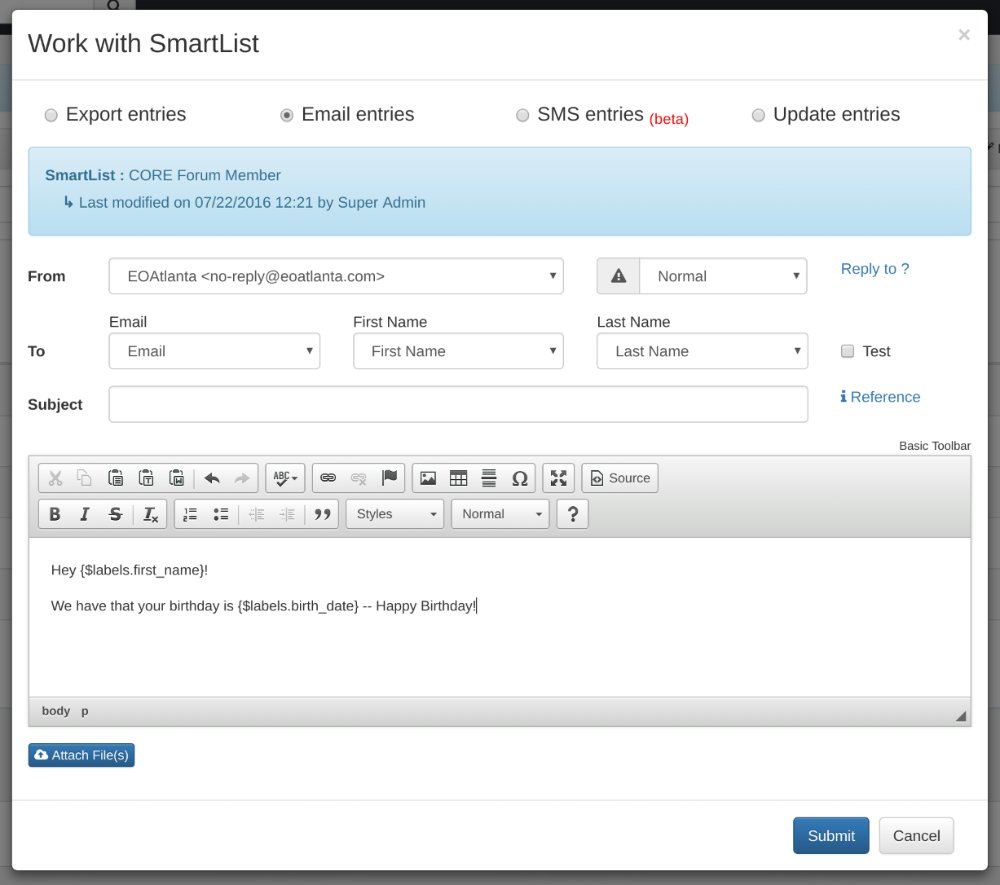
You are able to personalize any Email Message or SMS Text with any data field from a constituent's profile. Once delivered to a SmartList, the communication will display the personalized information for that individual constituent.
MessagesUpdated November 14, 20221 min read
You are able to personalize any Email Message or SMS Text with any data field from a constituent's profile. Once delivered to a SmartList, the communication will display the personalized information for that individual constituent.
We recommend personalizing every communication with the constituent's first name.
How to Use
Select your preferred SmartList
Select Options
Select Email or SMS Entries
Draft and format the email as desired
To look up Personalization Fields, select Reference
Copy and paste the Personalization Field shortcode (it will look like: {$labels.first_name})
When ready, press Submit to queue up delivery!
Did this answer your question?
If not, tell us what you were trying to do.